
| |

Fatal error: Uncaught Error: Call to undefined function wp_kses()

Error:

Fatal error: Uncaught Error: Call to undefined function wp_kses() in /home/e03qaszuq0bd/public_html/wp-includes/functions.php:6066 
Stack trace: 
#0 /home/e03qaszuq0bd/public_html/wp-includes/functions.php(5547): wp_trigger_error('', 'Function wpdb::...', 16384) 
#1 /home/e03qaszuq0bd/public_html/wp-includes/class-wpdb.php(1338): _deprecated_function('wpdb::escape', '3.6.0', 'wpdb::prepare()...') 
#2 /home/e03qaszuq0bd/public_html/wp-content/sunrise.php(11): wpdb->escape('www.ericstoltz....') 
#3 /home/e03qaszuq0bd/public_html/wp-includes/ms-settings.php(47): include_once('/home/e03qaszuq...') 
#4 /home/e03qaszuq0bd/public_html/wp-settings.php(154): require('/home/e03qaszuq...') 
#5 /home/e03qaszuq0bd/public_html/wp-config.php(107): require_once('/home/e03qaszuq...') 
#6 /home/e03qaszuq0bd/public_html/wp-load.php(50): require_once('/home/e03qaszuq...') 
#7 /home/e03qaszuq0bd/public_html/wp-blog-header.php(13): require_once('/home/e03qaszuq...') 
#8 /home/e03qaszuq0bd/public_html/index.php(17): require('/home/e03qaszuq...') 
#9 {main in /home/e03qaszuq0bd/public_html/wp-includes/functions.php on line 6066

Steps to Fix the Error:

  1. Identify the Issue: The error indicates that the wp_kses() function is missing, which suggests that the core WordPress files may be corrupted or incomplete.
  2. Access Your Site: Temporarily disable the code causing the error to log into the WordPress admin area. This can be done by renaming the file or folder that contains the problematic code.
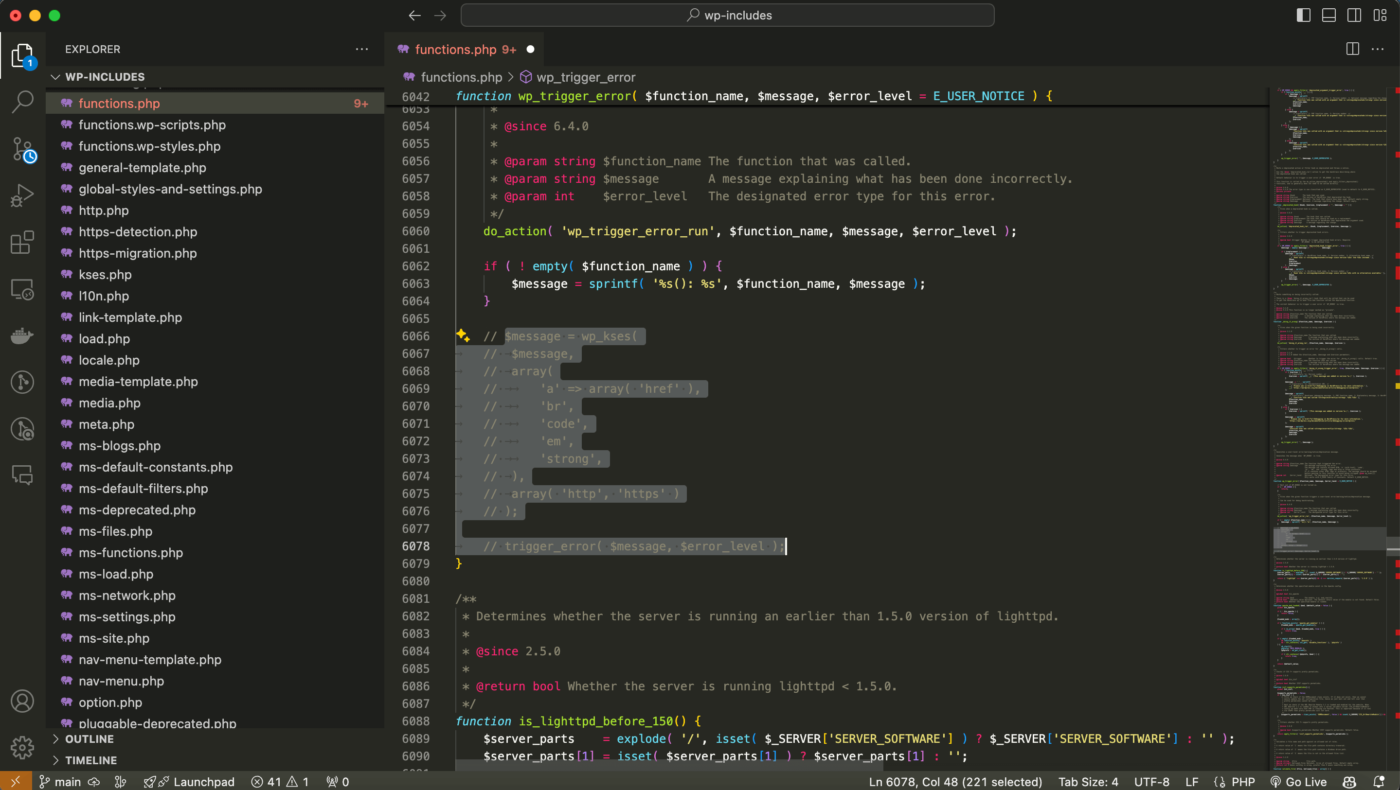
  3. In this case, temporarily comment out the code as shown in the image below, then you can access wp-admin to re-install WordPress.
  4. Reinstall WordPress Core Files via WordPress Admin:
    • Once logged into the WordPress admin area, navigate to Dashboard > Updates.
    • Click on the “Re-install Now” button to reinstall the WordPress core files automatically.
  5. Check for Success: After the reinstallation is complete, visit your website to ensure that the error has been resolved. Verify that all functionalities are working correctly.
Additional Tips:

  • Backup Your Site: Always take a full backup of your site (both files and database) before making any significant changes.
  • Check for Plugin Conflicts: If the issue persists, deactivate all plugins and reactivate them one by one to identify if a plugin is causing the conflict.
  • Contact Hosting Support: If you’re unable to resolve the issue on your own, consider contacting your web hosting provider’s support team for assistance.

By following these steps, you should be able to resolve the wp_kses() function error and restore your WordPress site to normal operation.
Similar Posts

122 Comments

  1. Got this exact fatal error after a WordPress update. Your solution of loading the file early fixed it perfectly.

  2. This was causing my entire site to go down. Thank you for the clear explanation of why this happens and how to fix it.

    1. White screen errors are stressful! Understanding the function loading order helps prevent these issues in the future.

  3. Got this exact fatal error after a WordPress update. Your solution of loading the file early fixed it perfectly.

  4. This was causing my entire site to go down. Thank you for the clear explanation of why this happens and how to fix it.

    1. White screen errors are stressful! Understanding the function loading order helps prevent these issues in the future.

  5. Got this exact fatal error after a WordPress update. Your solution of loading the file early fixed it perfectly.

  6. This was causing my entire site to go down. Thank you for the clear explanation of why this happens and how to fix it.

    1. White screen errors are stressful! Understanding the function loading order helps prevent these issues in the future.

  7. Got this exact fatal error after a WordPress update. Your solution of loading the file early fixed it perfectly.

  8. This was causing my entire site to go down. Thank you for the clear explanation of why this happens and how to fix it.

    1. White screen errors are stressful! Understanding the function loading order helps prevent these issues in the future.

  9. Got this exact fatal error after a WordPress update. Your solution of loading the file early fixed it perfectly.

  10. This was causing my entire site to go down. Thank you for the clear explanation of why this happens and how to fix it.

    1. White screen errors are stressful! Understanding the function loading order helps prevent these issues in the future.

  11. Got this exact fatal error after a WordPress update. Your solution of loading the file early fixed it perfectly.

  12. I traced this to a plugin that was calling wp_kses() too early in the bootstrap. Your fix works.

    1. Making sure all function calls happen after the appropriate hook (like ‘init’ or ‘plugins_loaded’) prevents this.

  13. My client’s site went down at 2am because of this error. Wish I found this article sooner!

  14. Clear and concise troubleshooting guide. This is how WordPress error docs should be written.

    1. Making sure all function calls happen after the appropriate hook (like ‘init’ or ‘plugins_loaded’) prevents this.

  15. I traced this to a plugin that was calling wp_kses() too early in the bootstrap. Your fix works.

    1. Making sure all function calls happen after the appropriate hook (like ‘init’ or ‘plugins_loaded’) prevents this.

  16. I traced this to a plugin that was calling wp_kses() too early in the bootstrap. Your fix works.

    1. Making sure all function calls happen after the appropriate hook (like ‘init’ or ‘plugins_loaded’) prevents this.

  17. Clear and concise troubleshooting guide. This is how WordPress error docs should be written.

  18. I traced this to a plugin that was calling wp_kses() too early in the bootstrap. Your fix works.

    1. Making sure all function calls happen after the appropriate hook (like ‘init’ or ‘plugins_loaded’) prevents this.

    1. Making sure all function calls happen after the appropriate hook (like ‘init’ or ‘plugins_loaded’) prevents this.

    1. Making sure all function calls happen after the appropriate hook (like ‘init’ or ‘plugins_loaded’) prevents this.

Leave a Reply

Your email address will not be published. Required fields are marked *