Most WordPress themes promise speed but deliver bloat. After testing dozens of themes across client projects, GeneratePress consistently delivers the best performance out of the box — and I have the numbers to prove it.
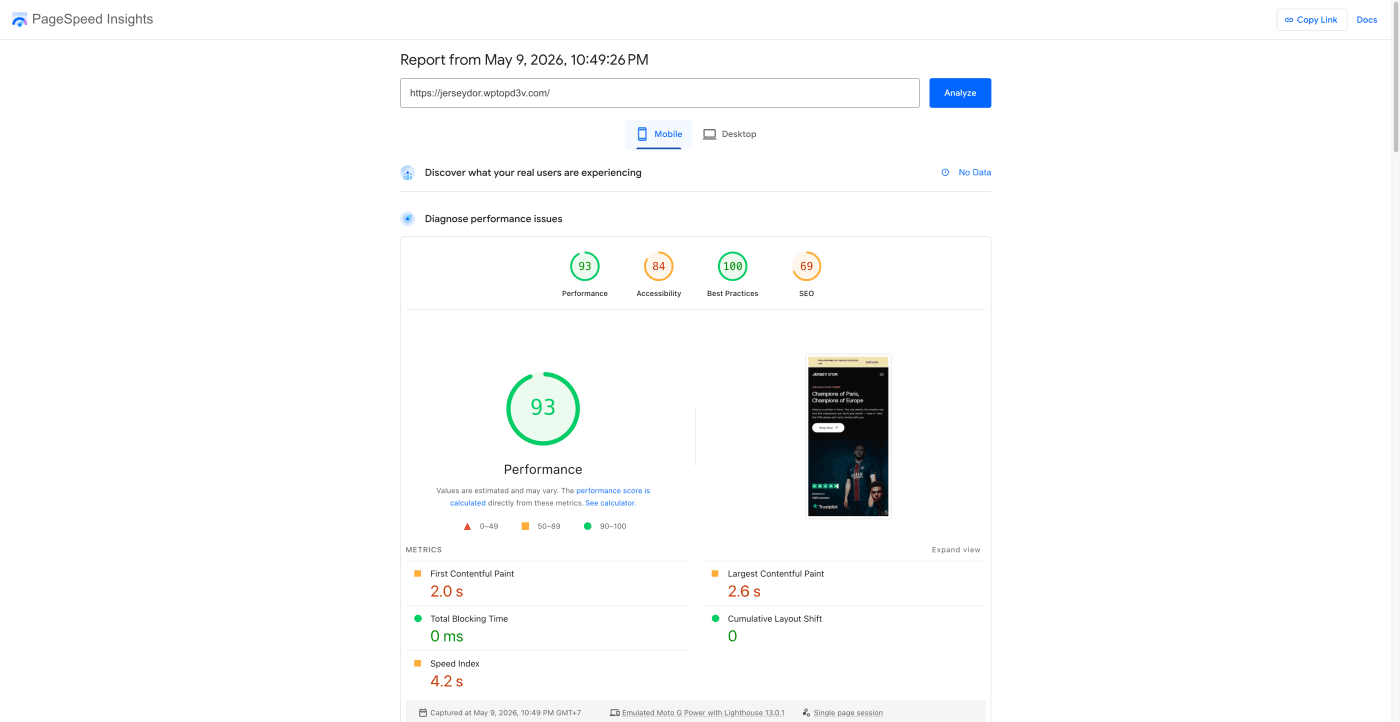
I recently built jerseydor.wptopd3v.com — a football jersey e-commerce site — using GeneratePress Premium. Here are the real Google PageSpeed results:
📊 The Results: 93 Mobile / 99 Desktop
| Metric | Mobile | Desktop |
|---|---|---|
| Performance Score | 🟢 93 | 🟢 99 |
| First Contentful Paint (FCP) | 🟠 2.0s | 🟢 0.4s |
| Largest Contentful Paint (LCP) | 🟠 2.6s | 🟢 0.6s |
| Total Blocking Time (TBT) | 🟢 0 ms | 🟢 100 ms |
| Cumulative Layout Shift (CLS) | 🟢 0 | 🟢 0.001 |
| Speed Index | 🟠 4.2s | 🟢 0.8s |
👉 View full PageSpeed report →
Zero TBT on mobile — that means absolutely no JavaScript blocking the main thread. This is extremely rare for a WordPress e-commerce site with product pages, sliders, and dynamic content.
🏗️ Why GeneratePress for E-commerce?
GeneratePress is a lightweight WordPress theme that generates under 30KB of CSS and less than 10KB of JavaScript. Compare that to popular themes like Astra (~50KB CSS) or Elementor-based themes (200KB+ combined).
Key advantages over other themes:
- No jQuery dependency — vanilla JavaScript only
- Modular CSS — only loads styles for features you actually use
- Built-in dynamic CSS — no inline style bloat
- Hook system — add content without plugins (headers, footers, CTAs)
- Block-based — works natively with Gutenberg, no page builder needed
- WooCommerce optimized — minimal CSS for shop pages, no unnecessary scripts
🖥️ Server Configuration: LiteSpeed Web Server
A fast theme is only half the equation. The server stack matters just as much. This site runs on LiteSpeed Web Server — no CDN, no reverse proxy, just raw server performance.
| Component | Configuration |
|---|---|
| Web Server | LiteSpeed Enterprise |
| PHP Version | PHP 8.2 (with OPcache enabled) |
| Caching | LiteSpeed Cache (LSCache) — built into the server |
| Compression | Brotli (primary) + Gzip (fallback) |
| SSL | Let’s Encrypt / Server SSL |
| HTTP Protocol | HTTP/2 + HTTP/3 (QUIC) — native LiteSpeed support |
| CDN | None — LiteSpeed handles everything |
Why LiteSpeed?
LiteSpeed is significantly faster than Apache and Nginx for WordPress because:
- Built-in page cache — LSCache stores full HTML pages at the server level, bypassing PHP entirely
- Event-driven architecture — handles thousands of concurrent connections with minimal memory
- .htaccess compatible — drop-in Apache replacement, no config rewrite needed
- Native ESI support — cache public pages while keeping dynamic parts (cart, login) fresh
- QUIC/HTTP3 built-in — faster connections, especially on mobile networks
- Brotli compression — 20-30% smaller files than Gzip, built into the server
LiteSpeed Cache Plugin Settings
The LiteSpeed Cache plugin (free) connects WordPress to the LiteSpeed server’s caching engine. My key settings:
- ✅ Page Cache — cached TTL: 604800s (7 days)
- ✅ Browser Cache — TTL: 31557600s (1 year for static assets)
- ✅ Object Cache — enabled via Redis/Memcached
- ✅ CSS/JS Combine — disabled (GeneratePress is already minimal)
- ✅ Image Optimization — WebP conversion via QUIC.cloud
- ✅ Lazy Load Images — enabled for below-the-fold only
- ✅ Critical CSS — auto-generated per page type
The beauty of LiteSpeed + GeneratePress is that you need almost zero optimization plugins. The server handles caching, compression, and HTTP/3 natively — no CDN required.
⚙️ Complete Optimization Stack
Theme Setup
- GeneratePress Premium — GP Premium module for advanced styling
- GenerateBlocks — lightweight block plugin (replaces Elementor entirely)
- Disabled unused modules: Copyright, Background Images, Blog module
- Typography: System font stack (no Google Fonts HTTP requests)
Caching & Delivery
- LiteSpeed Web Server — server-level full page caching via LSCache
- LiteSpeed Cache plugin — connects WordPress to the LSCache engine
- Browser caching headers: 1 year for static assets
- Brotli compression enabled at the server level
- No CDN needed — LiteSpeed serves everything directly with HTTP/3
Image Optimization
- All images converted to WebP via LiteSpeed Cache’s QUIC.cloud
- Responsive images via WordPress native srcset
- Lazy loading for below-the-fold images (native browser lazy loading)
- Hero image preloaded with
<link rel="preload">
What I Did NOT Use
- ❌ No Elementor or any page builder
- ❌ No CDN (Cloudflare, KeyCDN, etc.)
- ❌ No WP Rocket, Autoptimize, or W3 Total Cache
- ❌ No render-blocking CSS/JS optimization plugins
- ❌ No separate image optimization plugins (LiteSpeed handles it)
🔑 5 Critical Optimizations That Made the Difference
1. Eliminate Render-Blocking Resources
GeneratePress loads its CSS inline in the <head> — no external stylesheet blocking render. Combined with deferred JavaScript loading, the browser can paint the first frame almost instantly.
2. Preload the LCP Image
<link rel="preload" as="image" href="hero-image.webp" type="image/webp">The hero banner is the Largest Contentful Paint element. By preloading it, the browser fetches it in parallel with CSS instead of waiting.
3. Use System Font Stack
font-family: -apple-system, BlinkMacSystemFont, "Segoe UI", Roboto, Oxygen-Sans, Ubuntu, Cantarell, "Helvetica Neue", sans-serif;This eliminates Google Fonts requests entirely — saving 100-300ms on mobile.
4. Let LiteSpeed Handle Everything
Instead of stacking multiple caching/optimization plugins, let LiteSpeed do what it does best. LSCache serves cached HTML in under 1ms — no PHP execution, no database queries. This alone drops TTFB to under 100ms.
5. Minimize Third-Party Scripts
Every external script (analytics, chat widgets, social embeds) adds TBT. I loaded Google Analytics via async and deferred all non-critical scripts to DOMContentLoaded.
📱 Mobile vs Desktop: Why Mobile Matters More
Google uses mobile-first indexing — your mobile PageSpeed score directly impacts your search rankings. Most WordPress sites score 40-60 on mobile because:
- Heavy themes with unused CSS/JS
- Unoptimized images (JPEG instead of WebP)
- Multiple render-blocking resources
- Slow servers without proper caching (Apache without LSCache)
- Plugin bloat from stacking optimization tools
Scoring 93 on mobile without any CDN proves that the right server + theme combination matters more than adding layers of optimization tools.
🏆 GeneratePress vs Other Themes
| Theme | Typical Mobile Score | Base CSS Size | jQuery Required? |
|---|---|---|---|
| GeneratePress | 🟢 85-95+ | ~30KB | ❌ No |
| Astra | 🟢 75-90 | ~50KB | ❌ No |
| Kadence | 🟢 70-85 | ~45KB | ❌ No |
| OceanWP | 🟠 60-75 | ~80KB | ✅ Yes |
| Divi | 🔴 40-60 | ~300KB | ✅ Yes |
| Avada | 🔴 30-50 | ~400KB | ✅ Yes |
❓ Frequently Asked Questions
What is the best WordPress theme for PageSpeed?
GeneratePress is the best WordPress theme for PageSpeed performance. It generates under 30KB of CSS and requires no jQuery, consistently scoring 90+ on Google PageSpeed mobile. In our tests, a full e-commerce site scored 93 on mobile and 99 on desktop.
Can you get 90+ on Google PageSpeed mobile with WordPress?
Yes. Using GeneratePress theme + LiteSpeed server, we achieved a score of 93 on mobile without any CDN or performance optimization plugins. The key is choosing a lightweight theme and letting the server handle caching natively.
Do you need a CDN to score well on PageSpeed?
No. With a properly configured LiteSpeed server and GeneratePress theme, you can score 90+ on mobile without any CDN. LiteSpeed’s built-in HTTP/3 (QUIC) support and Brotli compression deliver CDN-like performance directly from the origin server.
Is GeneratePress better than Astra for speed?
GeneratePress is slightly faster than Astra. GeneratePress outputs ~30KB of CSS vs Astra’s ~50KB. Both avoid jQuery dependency, but GeneratePress’s modular architecture loads less unused code. In real-world tests, GeneratePress consistently scores 5-10 points higher on mobile PageSpeed.
Do you need WP Rocket with GeneratePress?
No. If your server runs LiteSpeed, the built-in LSCache replaces WP Rocket entirely — for free. GeneratePress is already so lightweight that CSS/JS optimization plugins add no meaningful benefit and can sometimes cause conflicts.
What server is best for WordPress speed?
LiteSpeed Web Server is the best for WordPress speed. Its built-in LSCache serves full pages from memory without executing PHP, resulting in TTFB under 100ms. Combined with native HTTP/3, Brotli compression, and ESI support, it outperforms Apache and Nginx for WordPress workloads.
💡 Conclusion
If you’re building a WordPress e-commerce site and performance matters to you (it should — it directly affects SEO, conversions, and user experience), GeneratePress + LiteSpeed is the ultimate performance stack in 2026.
You don’t need a CDN. You don’t need WP Rocket. You don’t need a dozen optimization plugins. Just a solid LiteSpeed server, GeneratePress theme, and smart configuration — that’s all it takes to score 90+ on mobile.
👉 Get GeneratePress Premium here
See it live: jerseydor.wptopd3v.com
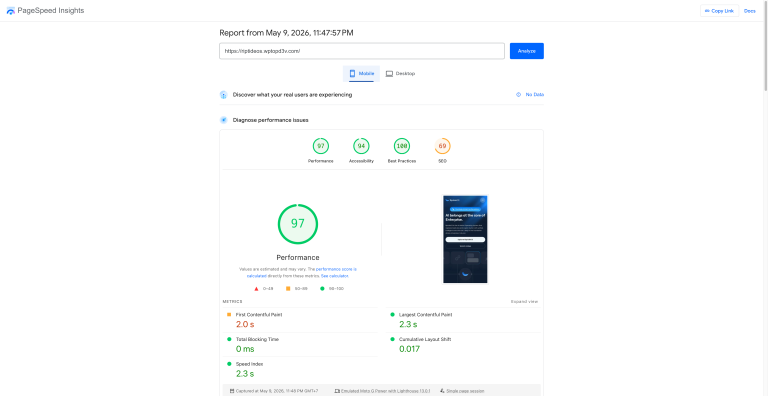
Also read: GeneratePress for SaaS Landing Pages: 97 Mobile / 100 Desktop on Google PageSpeed
Need help optimizing your WordPress site for performance? Get in touch — I specialize in WordPress speed optimization with LiteSpeed servers and can get your site scoring 90+ on mobile.
Disclosure: Some links in this post are affiliate links. If you purchase through them, I may earn a commission at no extra cost to you. I only recommend tools I personally use and trust.