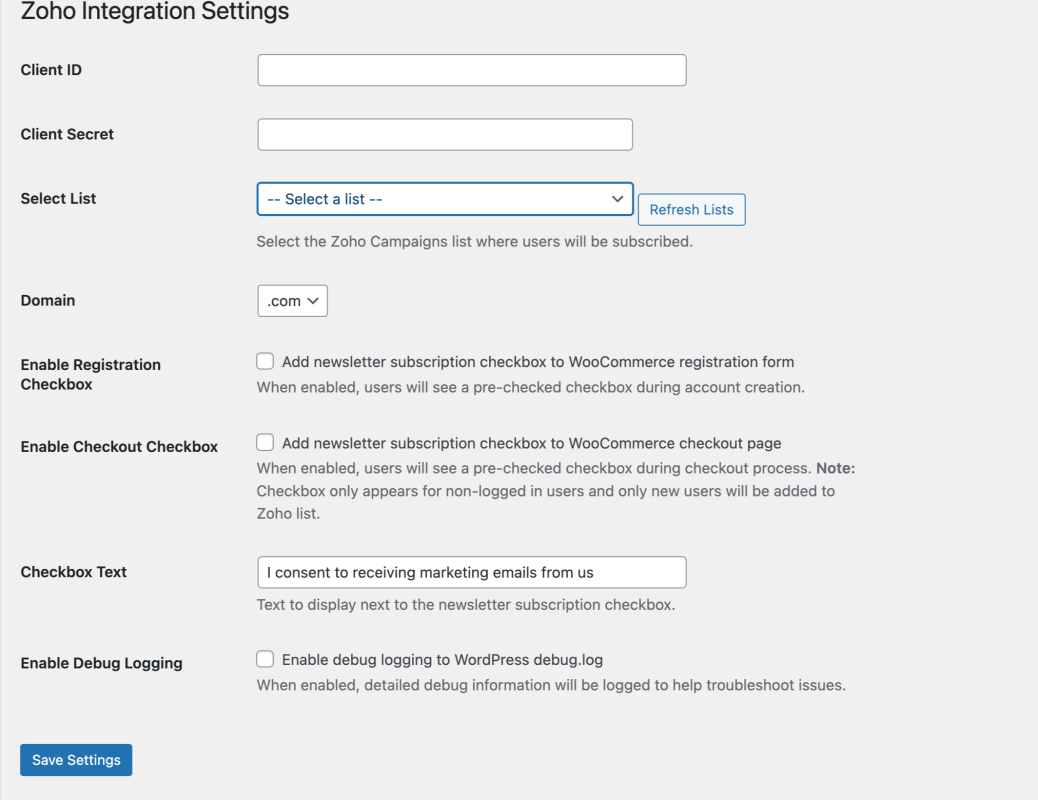
OAuth 2.0 Authentication — Secure connection with Zoho Campaigns using industry-standard OAuth 2.0 flow.
WooCommerce Integration — Automatic user subscription during registration and checkout process.
Newsletter Checkbox — Pre-checked subscription option in WooCommerce registration form and checkout page.
Admin Dashboard — Easy configuration and management with intuitive settings page.
Debug Logging — Comprehensive logging to WordPress debug.log for troubleshooting.
Canada Data Center — Full support for Zoho’s Canada data center (zohocloud.ca).
AJAX List Management — Dynamic loading and management of Zoho Campaign lists.
Customizable Settings — Flexible configuration options including custom checkbox text.
How It Works
Setup — Configure your Zoho Campaigns API credentials in the admin panel.
Authorization — Use OAuth 2.0 to securely connect with Zoho.
List Selection — Choose which Zoho Campaigns list to subscribe users to.
Auto-Subscription — Users are automatically added to your chosen list when they register or checkout.
Management — Monitor and manage subscriptions through the admin dashboard.
Requirements
WordPress 5.0 or higher
WooCommerce 5.0 or higher
PHP 7.4 or higher
Zoho Campaigns account with valid API credentials
Installation
Upload the plugin files to /wp-content/plugins/zoho-integration/
Activate the plugin through the Plugins screen in WordPress.
Go to Settings → Zoho Integration to configure.
Enter your Zoho Campaigns Client ID and Client Secret.
Click “Authorize with Zoho” to complete OAuth flow.
Select your mailing list and enable the newsletter checkbox.
FAQ
Frequently Asked Questions
What is Zoho Integration?
Integrate WooCommerce with Zoho Campaigns for automatic newsletter subscriptions. Features OAuth 2.0 authentication, newsletter checkbox, and auto-subscribe functionality.
What technology stack does this plugin use?
Zoho Integration is built with PHP, JavaScript, CSS, OAuth 2.0. Requires WordPress 5.0+. PHP 7.4+.
Was this plugin built with AI?
Yes, Zoho Integration was vibe coded using Cursor + Claude. AI-assisted development accelerates the build process while Duy Nguyen — a senior developer with 10+ years of WordPress experience — ensures code quality, security, and performance.
Is Zoho Integration free to download?
Zoho Integration is available under the GPLv2 or later license. 2 downloads so far.
Can Duy Nguyen build a custom plugin for my project?
Yes! Duy Nguyen builds custom WordPress plugins for clients worldwide, with 137+ completed projects and clear delivery expectations.
Ready to Start Your Project?
Let's discuss your WordPress needs and build something architectural together.